


How to use LNMP install Website environment
Install CentOS (6.X or 7.X);
Download LNMP package and install it.
wget http://soft.vpser.net/lnmp/lnmp1.5.tar.gz -cO lnmp1.5.tar.gz && tar zxf lnmp1.5.tar.gz && cd lnmp1.5 && ./install.sh lnmp
If wget: command is not found you can also install wget firstly,
yum install wget
When installing the LNMP, you can select Mysql version like this:
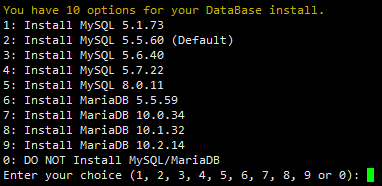
enter password:

PHP version:
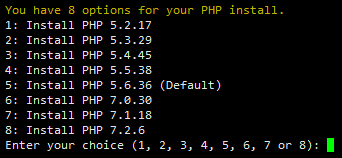
When install program is finished, it will rewrite your firewall config and accept 80 / 443 tcp port.
Related Tutorials
Installing ServerPilot and Creating an App on Ubuntu 14.04 LTS 64bitInstall Percona Server 5.7 MySQL on Ubuntu, CentOS or Debian
How to Install OpenLiteSpeed with PHP 7.3 and MariaDB 10.4 on CentOS 7
Installing Drupal on Ubuntu 16 VPS Server
CentOS compiler installed under the Apache, PHP, MySQL
comments (1)
fritznembu
- 7 years agogreat explanation